An Introduction to Scopus Analyze Results (now live!)

The primary feature in last Sunday’s Scopus release is the new “Analyze results” tool previewed in my last post.  This builds directly on the “Export refine” functionality launched last May.  “Export refine” enabled much of the same analysis, but required a user to manipulate raw data in a CSV file.  By adding this directly into Scopus, “Analyze results” expands the reach of this functionality to less advanced users.

“Analyze results” is also a descendant of the Documents section of the Author Evaluator launched in August 2010.  Essentially “Analyze results” expands the ability of the Author Evaluator from visualizing information about a single author’s publications to visualizing aggregate publication information on any arbitrary set of results.  Thus, the power of “Analyze results” is proportionate to the care and complexity of the query being examined.

Worth noting is that, “Analyze results” is different from the existing “View Citation Overview” function in that it evaluates quantity rather than quality.  Another difference is that “Analyze results” examines the whole set of results, while “View Citation Overview” looks only at a selected subset of results.  However, there are links within “Analyze Results” to the appropriate quality analysis tools in Scopus including the Journal Analyzer and Author Evaluator.

I am most excited about the “Source Title” tab of “Analyze Results” because it takes analysis one step deeper than a simple “Export refine”.  Furthermore, I believe the link to “Compare Source Titles in Journal Analyzer” is the true killer feature of  “Analyze Results” as it will enable a user to compare journals on both subject matter and quality.  An example of this is described in both the training desk video and my previous post.

Please feel free to share feedback or comments on “Analyze results” or other enhancements from this release.

Screenshot highlighting compare link in source title tab


SNEAK PREVIEW Scopus Analyze Results: Overview and use case

In the next release of Scopus, we will be launching a new Analyze Results tool.  This is a sneak preview of what it will do and a couple examples of different use cases.  Feedback is welcome.

Raising visibility of local data collections through linking with international publication databases (Belgrade, Serbia)

11th International Conference on Scientific Digitalization of Cultural and Scientific Heritage, University Repositories and Distance Learning

UPDATE – The video of the presentation is now available.

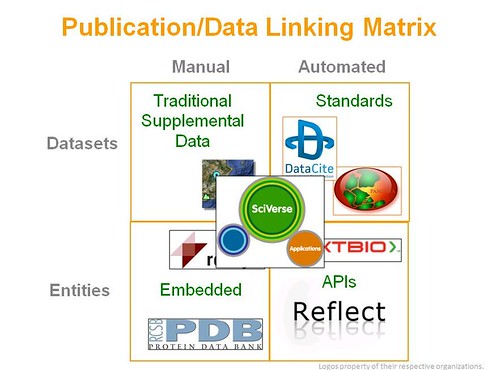
This past weekend, I had the opportunity to visit Belgrade as a speaker at the 11th International Conference on Scientific Digitalization of Cultural and Scientific Heritage, University Repositories and Distance Learning.  It was an excellent conference with even better hosts.  My presentation discussed different ways that finished publications can be connected with related data.  The below matrix summarizes the different options and the examples covered in the presentation:

Publication/Data Linking Matrix

The full presentation is below along with my notes:

View more documents from Michael Habib
Abstract:  Connecting locally hosted data repositories to internationally hosted related articles has never been easier.  With APIs and other web services becoming standardized at the same time that new linking standards, such as Datacite DOIs, are being adopted, new ways to distribute and mashup content are now possible.  This presentation will explore emerging trends in linking scholarly literature to data.  Both entity linking and data linking will be discussed.  Examples will be presented demonstrating how these technologies are being employed by publishers and A&I vendors in cooperation with local data repositories.